How accurate are Apple Watch calories?
Apple Watch calories are a weak number to eat back at dinner. Heart rate stays close to a lab reading, while lifting ran about 158 kcal above a metabolic cart.
Apple Watch calories are an estimate, and the error is inconsistent and often large. Heart rate on the same watch usually stays close to a reference measurement. The calorie number is a model on top of that pulse, so it is a weak number to eat back.
A 2025 meta-analysis of Apple Watch studies found every energy-expenditure subgroup above a 10 percent error threshold, and no heart-rate subgroup above that line (Physiological Measurement). A 2026 living review, with a search through September 24, 2025, found the same split. Heart-rate error was moderate. Calorie error was inconsistent and often large (npj Digital Medicine).
Use the watch for heart rate, the workout log, and whether active calories are drifting across similar weeks. Set your food from a target you can test. The TDEE calculator is a starting estimate. If that estimate already includes your usual training, adding the watch counts the same activity again.
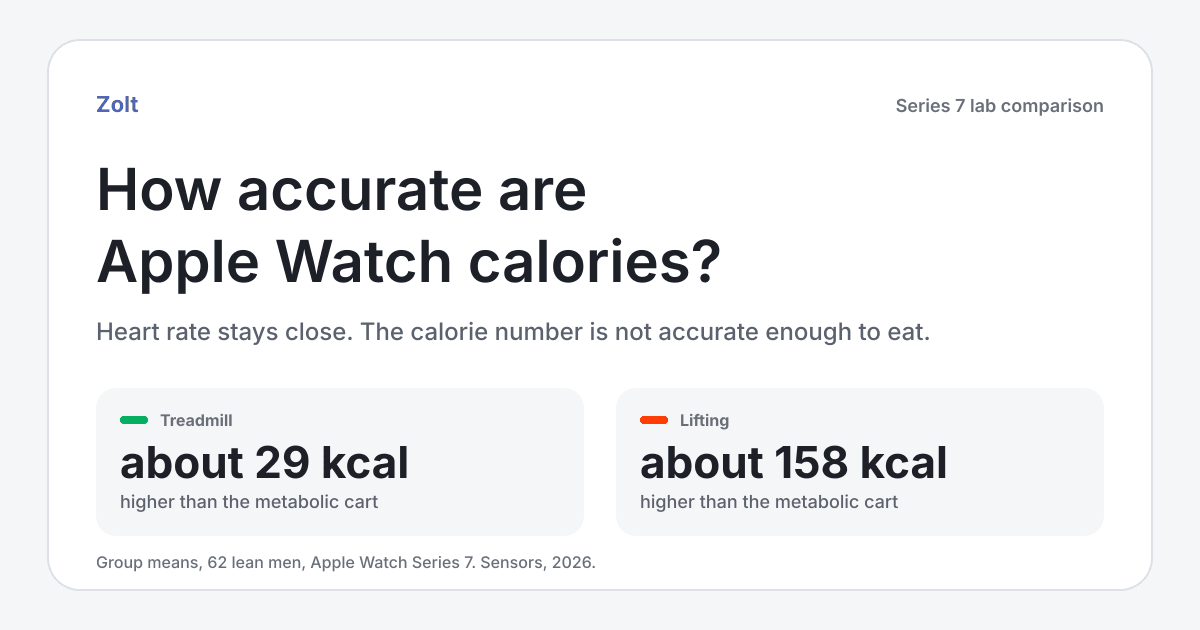
Group means from the Series 7 study below. The lifting gap is about 158 kcal. The chart later in the article shows the lab and watch totals together.
Active calories, resting energy, and the workout total
The red Move ring is active calories: energy the watch attributes to movement above rest (Apple's activity guide). Resting energy is a separate estimate of what it costs to keep you alive, including breathing, circulation, and ordinary cell maintenance (Apple HealthKit). Apple can split a total into those two parts from an estimated resting metabolic rate and the length of the interval. Active energy is the part that counts toward the Move ring (HealthKit's split of total energy).
That active number is what people mean when they ask whether Apple Watch active calories are accurate. A workout summary can also show total calories, and that total can include the resting slice for those minutes. A daily maintenance target already includes resting energy for the whole day. If you eat the workout total back, you count that slice a second time.
Adding active and resting still does not measure laboratory energy expenditure. The living review found large calorie error at rest as well as during exercise, and the watch does not know what you ate. If you match your intake to the all-day total, you import that error into the diet.
| Number on the watch | What it is | Default for food |
|---|---|---|
| Move ring, or active calories | Estimated energy above rest | Leave it out when usual training is already in the target |
| Resting energy | Estimated cost of staying alive, from your profile | Already inside a TDEE target |
| Workout total calories | Can include rest for that duration plus the active estimate | Eating it back counts rest twice |
| Heart rate | An optical pulse, and usually the stronger signal | Use it for effort, not as a meal allowance |
The calorie model uses the body details stored in Health. Apple says height, weight, gender, and age enter the calculation, and that calibration improves distance, pace, and calorie estimates (measurement guidance). A stale weight in Health Details changes the calorie number even when the workout did not.
The watch measures a pulse. It estimates calories.
Heart rate comes from the optical sensor. Calories are a model on top of that pulse, plus motion, GPS when the workout uses it, and your profile. Apple says the watch chooses inputs from the workout type. An indoor run also uses the accelerometer. Rhythmic movement, such as running or cycling, gives the heart-rate sensor a cleaner signal than irregular movement, such as tennis or boxing.
Two workouts of the same length can show very different calorie totals. You can get a believable heart rate and a calorie number you should not eat.
Apple Watch calorie accuracy is worse than heart rate
The 2025 meta-analysis pooled 56 studies and 270 effect sizes: 71 for energy expenditure, 148 for heart rate, and 51 for steps. Average energy-expenditure bias was small, 0.30 kcal per minute, but the limits of agreement ran from -2.09 to 2.69 kcal per minute. Heart-rate bias was -0.12 beats per minute, with limits from -11.06 to 10.81. Every energy-expenditure subgroup summarized with mean absolute percentage error sat above 10 percent. No heart-rate subgroup did.
Limits of agreement describe the spread between the watch and the reference. They are not a personal correction you subtract from dinner.
If a miss of that size lasted a whole 45-minute session, the average bias would be 13.5 kcal, because 0.30 times 45 is 13.5. The limits would be about 94 kcal one way and 121 kcal the other, because 2.09 times 45 is 94 and 2.69 times 45 is 121. The meta-analysis did not publish a 45-minute total. The multiplication only shows how a small average bias can still be a large miss on one workout.
The 2026 living review is the broader update, with 82 studies of 14 health metrics. Pooled heart rate, rest and exercise combined, had a mean bias of -0.27 beats per minute and limits of agreement from -7.19 to 6.64. Agreement was strongest at rest, and weaker during irregular movement and among people with arrhythmia. During exercise, 10 of 11 studies reported a mean absolute percentage error under 10 percent. Error tended to rise as intensity rose, though three studies went the other way.
Energy expenditure could not be pooled. The calorie section rests on 8 studies and 270 participants, mostly young and physically active, and five of those eight studies tested a Series 2 or older. All six studies that calculated mean absolute percentage error reported at least 20 percent in one test condition. Across conditions, that error ran from 9.71 percent during running to 151.66 percent during walking. Intensity did not sort the results into a clean pattern. The walking figure is the top of the published range, not the error on a typical walk.
The living review could not show that newer hardware had turned calorie burn into a measurement, and most of its calorie studies used older watches. A Series 7 comparison published in April 2026, after that review's search cutoff, still separated the pulse from the calories.
Apple Watch calories for lifting and the treadmill
Apple Watch calories for lifting were the large miss: about 158 kcal above the metabolic cart. The treadmill session was much closer, about 29 kcal above the cart.
In that Series 7 study, 62 healthy men with a BMI at or below 25 completed two protocols while wearing an Apple Watch, with ECG for heart rate and a metabolic cart for calories (Sensors). The endurance protocol was 28 minutes on a treadmill, staged from easier to harder. The lifting protocol was 34 minutes: two sets each of bench press, squat, T-bar row, and deadlift at a 10-rep max.
Heart rate stayed close in both. On the treadmill the Apple Watch bias was -0.97 beats per minute, with limits from -7.41 to 5.48. During lifting the bias was -0.53 beats per minute, with limits from -6.76 to 5.69. Lifting was also the mode where, of the four watches tested, only the Apple Watch was not statistically different from the ECG.
Calories did not follow the pulse.
| Protocol | Metabolic cart | Apple Watch Series 7 |
|---|---|---|
| 28-minute staged treadmill | 204 kcal | 233 kcal |
| 34-minute lifting session | 141 kcal | 299 kcal |
Apple Watch vs a metabolic cart
The published means are 203.75 kcal on the cart and 232.87 on the watch for the treadmill protocol, and 140.79 and 299.10 for lifting. The table and the chart round those means. The watch averaged higher in both sessions: about 29 kcal on the treadmill, and about 158 kcal during lifting. The paper reports Bland-Altman biases of -32 kcal and -158 kcal and calls both underestimation. Compared with the group means, that negative sign means the watch came out higher than the cart. The lifting bias matches the 158 kcal gap in the averages. Use those averages. Do not rescale your own workout by 141 divided by 299. The sample is lean men, one watch series, and two lab protocols.
Lifting is a poor fit for a calorie model even when the pulse is fine. The work comes in short efforts separated by rest, and heart rate does not rise and fall in lockstep with oxygen use. A model that turns pulse and wrist motion into calories can miss the cost while the heart-rate trace still looks right.
HYROX has not been the test in these reviews. The nearest published protocol is stop-start work with awkward arm positions: a 2024 study of 50 male soldiers during close-quarters battle training, including sprints, stairs, and weapon handling, recorded on an Apple Watch Series 5 with the HIIT workout type (European Journal of Sport Science). Mean absolute percentage error was 0.6 percent for heart rate and 11.3 percent for energy expenditure. The calorie figure missed the 10 percent line the authors required, so they did not recommend the watch for calories in that session. The cart averaged 372 kcal over about 27 minutes. That is not a HYROX race. It does show that irregular, loaded work can keep a good pulse and still miss on calories, and that the miss is not always the doubling seen in the lifting lab.
| Session | What held up | What to do with the calories |
|---|---|---|
| Steady run, ride, or walk | Heart rate is usually the stronger signal. In the living review, running was the low end of calorie error and walking the high end. | Compare the same route. Leave the calories alone if that run is already in the week. |
| Lifting | Series 7 tracked the ECG closely in the 2026 lab study. The calorie average did not. | Log the session. Keep the food target. |
| HIIT or HYROX-style work | These reviews contain no HYROX calorie test. A military session logged as HIIT kept heart rate and missed the calorie cutoff. | Treat the total as a rough mark that the session happened. |
Should you eat Apple Watch calories back?
A planned deficit shrinks when you eat a calorie credit the target already contained. A new training block can also raise expenditure. If you leave the old target in place, the cut gets larger than you planned.
Double counting is the usual way this goes wrong:
- A calculator set to a high activity level already priced in the usual runs and lifting. Importing the watch again counts those sessions twice. Why TDEE calculators give different answers is largely this accounting problem.
- An adaptive target built from real weeks already includes the training that produced the weight trend. Adding Tuesday's workout assumes the target forgot Tuesday.
- Workout total calories can include resting energy for that hour. A target built as TDEE already contains the day's rest.
- A food app that raises the budget when Apple Health syncs will do the adding for you.
Should you eat back exercise calories? is the decision for a session that really is new: a race block, two-a-days, or weight loss that is faster than planned. Eating half the watch number is a popular compromise. It is not a correction. The error changes size and direction with the activity, the person, and the workout type.
Maintenance calories move when body size, food intake, and daily movement change. One workout screen is a weak reason to edit the day. The week is the better unit.
Zolt is an iPhone and Apple Watch app with an adaptive TDEE. It learns your real burn from your weight trend and food logs, so you do not have to trust the watch calorie number.
A worked example
These figures are round numbers for the accounting. They are not a study result.
Someone is cutting on 2,200 calories. The target was built from a week that already includes four lifting sessions. On Tuesday, Traditional Strength Training shows 420 active calories and 490 total calories across 55 minutes.
Eating the 420 back makes Tuesday 2,620, even though that lifting pattern was already inside the 2,200. Eating the 490 also adds a resting slice for that hour, which the daily target already included.
The Series 7 lifting session above averaged 299 kcal on the watch and 141 kcal on the cart. A gap of that kind means a large share of a lifting total can be model error. Do not rescale 420 using those two means. The ratio belongs to that protocol. Leave Tuesday at 2,200, then judge the week.
Two observations justify a higher average intake. Trend weight is falling faster than the cut you chose, for more than a couple of weeks. Or sessions are getting worse, and hunger is crowding out training. The size of the change comes from that pattern.
On a bulk, adding 420 because the watch said so can make lifting days a much larger surplus than rest days. The scale then moves for a reason other than a measured burn.
What people do with the number
Community threads are anecdotes. They show the decision, not the measurement error.
In a March 2024 r/loseit thread, the poster was looking at an Apple Watch total near 2,300 calories and asking whether to trust it. Replies told them to ignore the calorie figure when choosing intake, especially if the activity level used for TDEE already included training, and to keep the watch for steps, heart rate, and the rings. That is personal advice. The double-counting point is the same one above.
A June 2022 r/AppleWatch thread starts from a strength-training screen that looked too high. The comments argue about rest time and workout type. The metabolic-cart comparison is the measurement those screenshots did not have. The comments do not establish the size of the error.
What to do instead
- Compare like with like: the same easy route, or the same lifting template, rather than one absolute number.
- Keep Health Details current, and pick the workout type that matches the session. Apple changes which sensors feed the estimate when the workout type changes.
- Read heart rate for effort. Read active calories as a rough mark that the week changed.
- Leave routine training inside the weekly food target.
- If a new block lasts long enough to move trend weight, change average intake then. How to tell whether a TDEE estimate is wrong is the checklist.
Outdoor calibration, as Apple describes it, can tighten distance and pace, which some calorie models use. It does not turn the result into a metabolic-cart measurement.
Intake and the weight trend skip the watch
Adaptive TDEE asks a different question. Log about 2,200 calories and, if trend weight is falling, expenditure over that window was higher than 2,200 logged calories. If trend weight is flat, 2,200 is close to maintenance for the way you log. The workout total never has to be right for that comparison to work.
The arithmetic is not pounds times 3,500. Weight change mixes fat, lean tissue, glycogen, water, and food in the gut, and expenditure shifts as body size and intake change. Understanding Adaptive TDEE is the full explanation. How long it takes to learn your real TDEE covers why a few days are a weak test.
In Zolt, the calorie target is not a copy of Move calories. Active calories can appear in activity views without a matching credit in the food target. Apple Watch is optional for the adaptive estimate, which uses nutrition and weight history. A lasting change in training can still move the target later, once that change shows up in the nutrition and weight record. Do active calories change a Zolt target? and how Zolt treats the watch estimate are the product pages.
Common questions
Are Apple Watch active calories accurate?
They estimate energy above rest. The reviews above did not find that estimate accurate enough to use as a food allowance. Heart rate, from the same device, is the reading with the tighter agreement.
Should I eat back Apple Watch calories on a cut?
Only when the session is outside the training the target already includes, and even then the adjustment should follow the week rather than the workout screen. Check whether you are looking at active calories or a total that includes rest. The eat-back article linked above is the decision table for a genuinely new training block.
Does a newer Apple Watch fix calorie burn?
The living review could not pool calorie results, and most of its calorie studies used older hardware. The Series 7 comparison from 2026 still showed a lifting gap of about 158 kcal against a metabolic cart. On the evidence checked here, a newer series is not a reason to eat the number.
What if one workout total looks absurd?
Confirm the workout type, that the weight in Health Details is current, and that a second app did not log the same session. A loose band or cold skin can also drop the heart-rate input the calorie model uses. Apple's measurement page, linked above, covers fit, wrist detection, and tattoos that can block the sensor.
Let intake and weight set the target
Log what you eat and weigh in. Zolt learns maintenance from that record, and Apple Watch activity can stay in the activity views without being copied into the calorie target.
Related articles
Should You Eat Back Exercise Calories?
Routine exercise may already be included in your target. Fuel demanding training, but do not match a watch calorie for calorie by default.
Why TDEE Calculators Give Different Answers
Different formulas and activity assumptions can move a TDEE result by hundreds of calories. The result still needs a real-world test.
How to Tell Whether Your TDEE Estimate Is Wrong
A persistent mismatch can expose a bad estimate. First rule out short time windows, incomplete food logs, and a changed routine.